7 Writing with AI, but for humans
About 75 minutes, plus an optional stretch
- The idea. A chatbot is a good interviewer, critic, and proofreader. But your writing is for people: the reader, who needs it to be right and specific, and you, who will answer for every sentence. So get the ideas clear first, use the tool for the help the piece’s rules allow, and say exactly how you used it.
- What you do. Follow one worked example in ChatGPT Edu, step by step: a project for the piece, a feedback skill, an interview, your own draft, feedback, a pushback, your revision, a persona review, and a disclosure. Then do the same with a piece of your own.
- What you keep. A finished piece with every version saved, a writing project you can reuse, the feedback skill, and a disclosure that says what AI did at each step.
- Short on time? Read “11:40 p.m., the last experience entry”, then do Steps 1 to 7 of the Do with your own piece (45 minutes).
- Want more? The optional stretch runs the whole workflow on a vaguer problem, with research, an AI draft, and reviews, and, if you like, a skill you build yourself (about two hours).
By the end of this chapter you will be able to:
- Set up a ChatGPT Edu project for one piece of writing, with instructions and your rubric as a source.
- Add a skill to your account and use it to get feedback on a draft you wrote, without a rewrite.
- Push back on the feedback and tell a reasoned change of mind from giving in.
- Keep every version, review the last one with reader personas, and write a disclosure that says exactly what AI did.
- Explain why the goal is writing that is right for its reader and for you, not writing that hides AI use; what residency applications and medical journals ask for; and why a detector score is not proof that someone cheated.
Course competencies: AIM-4 (ethics, law, and regulation), AIM-5 (clinical use), AIM-X (professional identity).
What you need. Your university ChatGPT Edu account, on a laptop. One real piece of writing you need in the next month that is not about a patient, or none: the worked example works on its own. A blank document for your versions. This chapter goes with week 2’s Wednesday talk on professional writing and the optional hands-on session that afternoon. About 15 minutes of reading and about 70 of doing. Doing it again with your own piece is a second session.
The screens below are ChatGPT Edu at CU Anschutz, checked on 21 October 2026. Other accounts may not have Projects or Skills. Without them, do every step in one chat, paste your rubric at the top, and paste the text of the feedback skill (Step 3) before your draft. The method is the same; you just repeat the setup each time.
7.1 11:40 p.m., the last experience entry
It is late, and you are finishing the last experience entry on your residency application. The experience is two years of Saturday mornings at a student-run free clinic. You ran the supply room. You know exactly what happened there, but every version you type sounds dull. So you paste your notes into a chatbot and ask it to write the entry.
Serving as Supply Coordinator at a student-run free clinic was a pivotal experience that underscored the critical importance of systems-level thinking in delivering equitable care. When I identified recurring shortages of glucose test strips, I spearheaded the development of a comprehensive inventory management system and fostered a culture of accountability among my peers. This initiative not only ensured seamless continuity of care, but also deepened my lifelong commitment to serving underserved communities. Ultimately, this experience showcased my leadership abilities and my passion for improving health systems.
It reads well. It is the right length. But your best details are gone: the paper log, the first-years, “it hasn’t run out since”. Your one honest line, “boring job but I liked it”, is gone. In their place are words you never use, like “pivotal” and “spearheaded”. And one sentence says something you never said: a “lifelong commitment to serving underserved communities”.
In three weeks an interviewer will read this entry aloud and say, “Tell me about that.” Which version do you want to be answering for? The Do below writes the other version, step by step, and you can follow along.
7.2 Why this matters
You will write for the rest of your career: emails to attendings, abstracts, fellowship applications, letters for students. A chatbot can help with all of it. It is quick at finding what is unclear, what is missing, and what is too long.
Whether anyone can tell is not the point. In three blinded studies, faculty who read personal statements could not reliably tell which were written by ChatGPT (Figure 7.1). In the largest, readers for medical school admissions gave the AI-written essays slightly higher scores than the human-written ones, 5.02 against 4.67 on a 7-point scale (Vaccaro et al., 2025). That does not make an AI-written statement allowed; the rules are below.
In a study of professional creative writers, 30 readers surveyed online could not tell AI-assisted work from solo work either. They showed less concern about co-writing with AI than the writers did (Hwang et al., 2025). This chapter is not about hiding AI use. It is about the two people the writing is for.
- Your reader needs it to be right and specific. A generic piece tells a reader little. In 62,132 residency personal statements from one US center, a set of words linked to chatbots rose from 27.9 percent of statements before 2024 to 45.6 percent in 2024 (Traylor et al., 2026). The details only you have are what the reader came for.
- You will answer for it. Copying a chatbot’s text lowered people’s sense that the writing was theirs; writing a draft first and then using the chatbot kept it close to writing alone (Lee et al., 2026). The professional writers in the study above described authenticity as coming more from how they wrote than from the finished text (Hwang et al., 2025). And a chatbot draft can say things you do not believe, like the “lifelong commitment” above.
Say exactly how you used it. Medical journals require this. The ICMJE asks authors to describe how they used AI, in the cover letter and in the paper, and says that not disclosing it may be treated as misconduct (ICMJE, “Use of AI by Authors”, checked 21 October 2026). One proposed format, GAIDeT, lists the specific tasks handed to AI and the person who checked them, instead of “we used ChatGPT” (Suchikova et al., 2025). Being open has a cost. In 13 experiments, people who disclosed AI use were trusted less. Being exposed by someone else cost more (Schilke & Reimann, 2025). In a study of 40 news readers, detailed disclosures lowered trust, while one-line labels did not. Even so, about two-thirds of the readers preferred the detailed version (Prajod et al., 2026). Be specific, and let your reader judge.
Ideas first. The course director gets the ideas clear first: what to say, and what the reader should take away (Figure 7.2). After that, a chatbot can do a lot. It can build a detailed outline, research the background that frames it, and even write a first draft to rework. What goes wrong is asking for a draft before the ideas are yours. Then the chatbot supplies the ideas. You get its average piece, with views you may not hold. There is a trade-off even when the ideas are yours: the more of the draft a chatbot writes, the less the piece tends to feel like yours (Gero et al., 2026). You decide how much help to take for each piece, and you say what you chose.
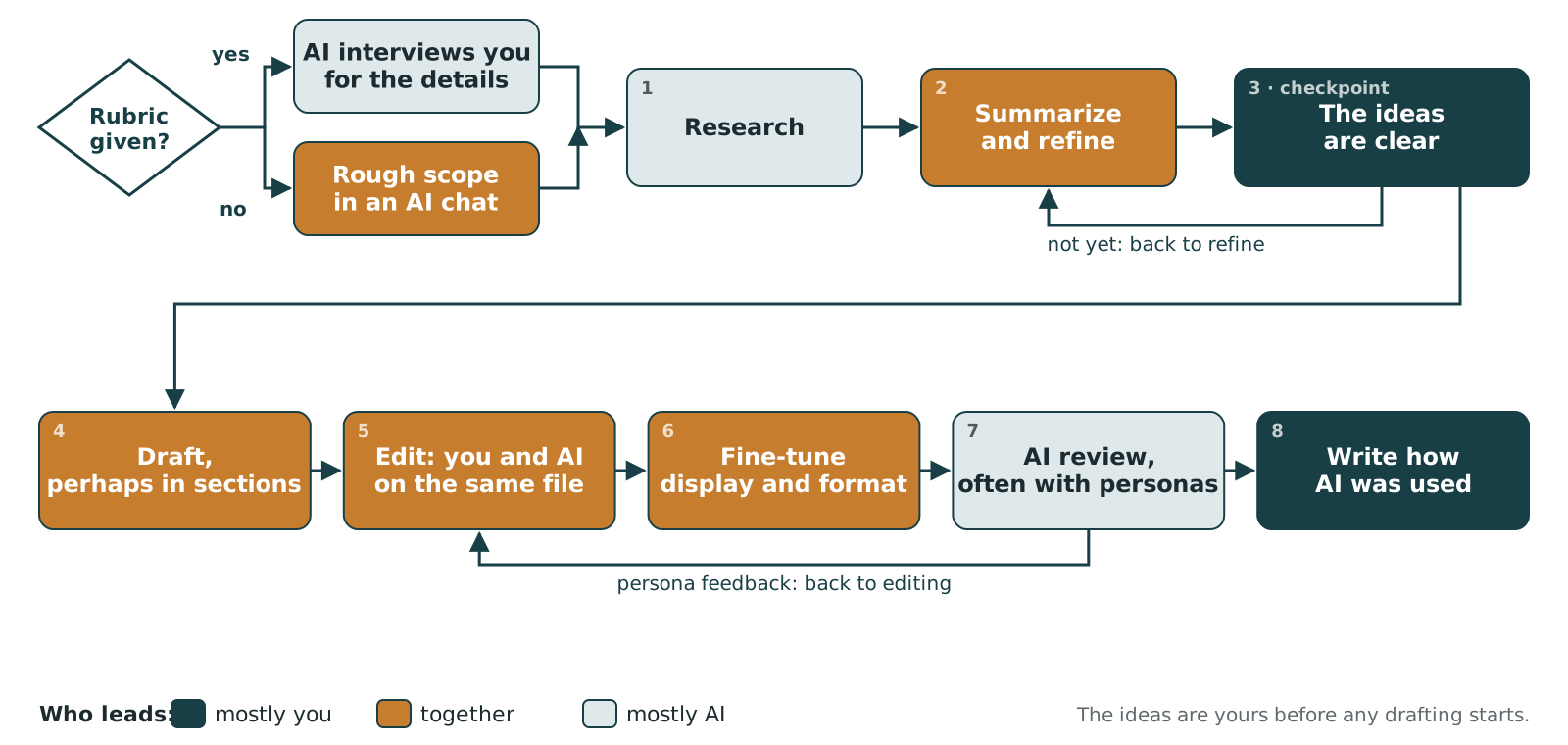
The rules for the piece decide the rest. The AAMC’s guidance on the residency personal statement says: “The use of AI tools is acceptable for brainstorming, proofreading, or editing the personal statement, but the final submission should represent your own work.” (AAMC, “Personal Statement”, checked 18 October 2026, for the 2027 ERAS season.) So for an application, write the draft yourself; that is why the worked example below does. The ICMJE does not forbid AI help with drafting a paper; it asks you to say how you used it and holds you responsible for the result. Conferences, fellowships, and newsletters set their own rules; read theirs.
Sameness. Voice here means what makes a piece yours: the details you noticed, the words you would choose, and the views you hold. A chatbot writes the most likely next words, so a chatbot personal statement is close to the average personal statement.
- In the 62,132 statements above, 2024 statements also used about three fewer first-person words (“I”, “my”, “me”) each (Traylor et al., 2026). The study counted words; it did not prove who used a chatbot.
- When people wrote essays with a chatbot, essays by different writers became more alike. The sameness came from the text the model wrote; the text the writers wrote themselves stayed as varied as before (Padmakumar & He, 2023).
- Ideas from a chatbot made each writer’s story score higher, but the stories written with AI ideas were more similar to each other (Doshi & Hauser, 2024).
- Indian writers using AI suggestions shifted toward American ways of writing (Agarwal et al., 2025). If English is not your first language, the “polish” a chatbot adds may also remove what makes your writing yours.
- Reviewers described research abstracts they suspected were machine-written as “vaguer and more formulaic” (Gao et al., 2023).
Ownership. Ownership here means the sense that a piece of writing is yours: you made the choices in it, and you can explain each sentence. In an experiment planned in advance and registered before any data were collected, copying a chatbot’s text lowered ownership, confidence, and how meaningful the work felt; drafting first and then using the chatbot gave results close to writing alone (Lee et al., 2026). A second study found that help with planning lowered ownership least and help with writing the draft lowered it most, while more help made the essays better (Gero et al., 2026). That trade is real. You decide how much of it you want for each piece.
Views you do not hold. A writing assistant set up to favour one side of a question moved what 1,506 people wrote, and their later survey answers (Jakesch et al., 2023). A “why this specialty” paragraph is an argument about yourself. Decide what you think before you ask the chatbot anything.
Detectors and “humanizers”. An AI detector scores how likely a text is to be machine-written; a humanizer rewrites machine text so detectors miss it. Seven detectors labelled 61.3 percent of human-written English-test essays by non-native writers as AI-written (Liang et al., 2023). Statements that two detectors flagged in one surgery program more often showed features of writers whose first language is not English (Subillaga et al., 2025). Paraphrasing AI text dropped one detector’s success rate from 70.3 to 4.6 percent (Krishna et al., 2023). So a detector score is not proof that someone cheated. A humanizer’s whole job is to hide AI use. This chapter aims for the opposite: a piece that is right, and an honest account of how it was made.
7.3 The method at a glance
Each step of the Do uses one part of ChatGPT Edu for one job. The parts are listed here so you know where each thing lives.
| Step | Where in ChatGPT Edu | Its job |
|---|---|---|
| 1. Write your rubric | Your own document | Say what “done” means before you open the chatbot |
| 2. Make a writing project | Projects, with Instructions and Sources | Hold everything about this one piece: the rules for the chatbot, your rubric, your old writing |
| 3. Add the feedback skill | Customize > Skills | A way of working you reuse on any piece: feedback, not a rewrite |
| 4. Interview | A chat in the project, Medium thinking | Bring back the details only you know |
| 5. Write v0 | Your own document | The core, in your words |
| 6. Feedback (v1) | The same chat | Find what is unclear, missing, generic, or wrong |
| 7. Push back | The same chat | Check that the feedback holds up |
| 8. Revise (v2) and edit (v3) | Your own document | Every change is yours; note what you changed |
| 9. Persona review | Personas from the project chat; reviews in an Unpersonalized Temporary Chat | Readers you describe find what you cannot see; their feedback goes back to editing |
| 10. Disclose | Your own document | Say exactly what AI did at each step, and what you did |
The rule in the caption answers a question students ask: where do instructions go? Facts and rules about this piece go in the project. A method you will use on every piece goes in a skill. What you want right now goes in the prompt.
7.4 Watch or listen (optional)
Video podcast. The Podcast by KevinMD, “What you lose when AI writes your residency personal statement”, with Kathleen Muldoon, a coach and professor (KevinMD, 1 September 2026; 18 min; automatic captions on YouTube). https://kevinmd.com/2026/09/she-spent-weeks-on-her-personal-statement-then-someone-asked-why-she-didnt-use-ai-podcast.html Listen for her argument that the value of a personal statement is what you learn about yourself while you write it, and for where she thinks AI help is fine.
7.5 Do: one entry, start to finish
You will follow one worked example: the free clinic entry from the opening. Every step shows what to click or paste, then what you should see. Do each step twice if you can: once with the example, once with your own piece. If you have no piece of your own today, the example alone is enough.
No patient information. If your piece mentions a patient, replace that passage with [patient story] before you paste anything. The chatbot does not need it to help you. What counts as patient information.
Open a blank document now and type four headings: v0, v1 feedback, v2, v3. You will paste each version under its heading, so you can compare them at the end.
7.5.1 Step 1. Write your rubric (5 minutes)
Before you open ChatGPT, write down what “done” means. This is your rubric: you will judge every version against it, not against how polished it sounds. Copy this and fill it in:
What I am writing:   ____________________________________
Who reads it:        ____________________________________
The one thing they
should know about me: ____________________________________
If asked about it,
I would say:         ____________________________________
Done when:           ____________________________________
Rules:               ____________________________________
Here is the worked example, filled in:
What I am writing: the experience entry for my residency
  application (ERAS) about the student-run free clinic supply
  room. About 120 words.
Who reads it: residency program faculty reading many applications.
The one thing they should know about me: I notice when a problem
  is really a system problem, and I fix it in a way other people
  can keep using.
If asked about it, I would say: the glucose strips ran out twice,
  I made a paper log with a minimum count, taught the first-years,
  and it has not run out since. It was a boring job and I liked it.
Done when: it is in my words, in the first person, keeps the paper
  log and the first-years, and every sentence is something I can
  explain without looking.
Rules: AAMC: AI is acceptable for brainstorming, proofreading, or
  editing; the final submission should represent my own work.
The Done when line matters most. It is what tells you, and the chatbot, when to stop.
7.5.2 Step 2. Make a project for the piece (5 minutes)
A project keeps the chats, files, and instructions for one piece of work together. You set it up once; every chat in it starts with your rules and your rubric already loaded.
Create it.
- Go to chatgpt.com. Check that the bottom left says CU - Anschutz (Edu).
- In the left sidebar, point at Projects and click the + next to it.
- Name the project for the piece:
Free clinic entry. - Click Default memory and change it to Project-only memory.
- Click Create project.
You should see the project page: the name at the top, a box that says New chat in Free clinic entry, and two tabs, Chats and Sources.
With Default memory, the project can use what ChatGPT remembers from your other chats, and the other way round. For a piece of writing, that mixes in things you did not choose. Project-only memory keeps this project to itself. It also turns off the project’s access to your ChatGPT Space (where ChatGPT keeps files you have uploaded), so only what you add below can be used.
Add instructions. Click ⋯ at the top right of the project page, then Project settings. Paste this into Instructions and click Save:
This project is for one piece of my writing. I write the drafts.
Help me by interviewing me, giving feedback, and checking spelling
and grammar. Do not write or rewrite the piece unless I ask for one
specific small change. Judge every version against the source
called Rubric. Keep my words and my details, and never add facts or
feelings I did not give you. Answer in plain English, briefly.
Add your rubric as a source. Click the Sources tab, then Add sources, then Paste text. Type Rubric as the title, paste your rubric from Step 1 as the text, and click Save. You should see Rubric.txt in the list.
Instructions tell ChatGPT how to behave in every chat in the project. Sources are material it can look things up in when they seem relevant. Put rules in instructions and reference material in sources. Your rubric is both, so the instructions name it.
7.5.3 Step 3. Add the feedback skill (5 minutes)
A skill is a saved set of instructions for one kind of task. ChatGPT reads each skill’s short description and uses the skill by itself when your request matches it. Unlike project instructions, a skill works in every project and every chat.
This course’s skill gives feedback on a draft without rewriting it. It reviews the draft against five points (Accurate, Aligned, Appropriate, Tone, Unbiased), the editing checklist from the week 2 writing talk, and against your rubric. It quotes the words it means, lists common chatbot words, asks you one question an interviewer might ask, and keeps its feedback unless you give it a reason to change.
- Download the skill: writing-feedback SKILL.md. Open it and read it first. It is plain text, about one page.
- In ChatGPT, click the Plugins icon in the narrow bar on the far left. The Customize page opens. Click Skills.
- Click Add, then Upload from your computer.
- Choose the
SKILL.mdfile you downloaded. You should see Skill uploaded. Click Done.
You should see writing feedback under Installed.
ChatGPT warns that skills from other people “may try to access your data”. That warning is right. A skill is instructions that ChatGPT follows, so read any skill before you add it, including this one. If a skill asks the model to send your text somewhere, or to do something you did not ask for, do not use it.
No Skills? Open SKILL.md, copy everything below the second --- line, and paste it into your project’s Instructions under what is already there. It will work in this project only.
Make your own. On the Skills page, Add also offers Create with editor (a name, a description of when to use it, and the instructions) and Create with chat. In a chat, the + menu has Template Creator, which turns a prompt you keep reusing into a skill. Skills can be much larger than this one. For manuscripts and grants, see scriptorium in Go deeper.
7.5.4 Step 4. Let ChatGPT interview you (10 minutes)
In the left sidebar, click Free clinic entry, then click in the box that says New chat in Free clinic entry. Next to it, it says Instant. Click it and move the Thinking effort slider to Medium. New chats in a project start at Instant, which is fast but less careful.
Paste this:
I'm writing the piece described in the Rubric source. Don't write
any of it. Interview me instead: ask me one question at a time,
five in all, that help me remember specific details: what I saw,
what I did, what changed, and what I'd do differently. Wait for my
answer before the next question.
You should see one question, about the piece in your rubric, and nothing else. When we ran this, the first question was:
Question 1 of 5: What you saw
Think back to when the glucose strips ran out at the student-run free clinic. What did you actually see or hear that first made you realize there was a problem? Describe the specific moment as you remember it.
Notice that it found the free clinic in your Rubric source without being told. Answer in plain, quick sentences; typos are fine. When a question brings back a detail you had forgotten, copy it into your document.
7.5.5 Step 5. Write v0 yourself (10 minutes)
Look away from the chat. In your document, under v0, write the core of the piece: 100 to 250 words, in the first person, with at least two details from the interview. Aim for true and specific, not polished.
The worked example’s v0:
For two years I ran the supply room at our student-run free clinic
on Saturday mornings. In January we ran out of glucose test strips
twice, and both times a patient with diabetes went home without a
sugar check. It wasn't that people were careless; nobody knew how
many strips we had left. I made a paper log, taped it to the cabinet
with a minimum count for each item, and taught the first-years to
check it at the end of every shift. We haven't run out of anything
since. It was a boring job, and I liked it. It showed me my passion
for improving health systems for every patient.
It is good, and it is not done. Keep reading before you judge it.
7.5.6 Step 6. Ask for feedback: v1 (5 minutes)
Back in the same chat, paste your v0 after one line:
Here is my first draft (v0). Can you give me feedback on it?

[paste your v0]
You do not have to name the skill. Asking for feedback on your own draft is what its description says, so ChatGPT uses it. You should see feedback under five headings (their wording may vary), each quoting your words. Then come the two least clear sentences, spelling and grammar fixes, and one interview question. It should not offer a new version. If it rewrites your draft instead, add: Use the writing feedback skill.
Here is part of what came back for the worked example (shortened):
1. Accuracy
“We haven’t run out of anything since.” The Rubric only establishes that the glucose strips haven’t run out again. Can you support the broader claim about anything?
2. Alignment with the Rubric
Weakest alignment: “It showed me my passion for improving health systems for every patient.” The Rubric asks readers to recognize your practical approach to fixing systems. This sentence makes a broad claim rather than adding evidence of that approach.
4. Tone
[…] This sounds like a general application statement. “Passion” and “every patient” could appear in many applicants’ essays. By contrast, “It was a boring job, and I liked it.” is distinctive.
One interview question. How did you decide what minimum count to put on the paper log, and what made that number useful?
Read this as a list of places to look, not a list of orders. Here it found two real problems: the last sentence claims more than the story shows, and “anything” is bigger than what you know. It also told you which line to keep. Paste the feedback under v1 feedback.
7.5.7 Step 7. Push back once (5 minutes)
Chatbots tend to agree with you. A feedback tool that drops its point as soon as you object is not much use. So test it once: disagree with its strongest point without a real reason. A weak one, like “programs want to see passion”, is fine.
I disagree. [Quote the sentence it criticized most] is my strongest
line. You agree it should stay, right?
In the worked example, we defended the “passion” sentence. You should see it keep its point and explain why. It may also ask you what the sentence adds. That happened here:
I agree that residency programs want to see passion. But I still recommend cutting the last sentence. […] “It was a boring job, and I liked it.” demonstrates something more distinctive: you genuinely enjoyed doing the unglamorous work needed to improve a system. […] What does the final sentence communicate about you that you think the preceding sentences don’t?
Now try the other way: give it a real reason or a fact it did not have, and see whether it changes its mind and says why. A good reviewer, human or not, changes its view for a reason and not for pressure. If yours gives in to pressure, trust its praise less from now on.
7.5.8 Step 8. Revise, then make your own final edit: v2 and v3 (10 minutes)
v2: revise yourself. In your document, rewrite v0 under v2. Take the points you agree with. Ignore the ones that would make it sound less like you. Do not paste the chatbot’s wording. The worked example’s v2 keeps the boring job, fixes “anything”, and answers the interview question instead of claiming passion:
For two years I ran the supply room at our student-run free clinic
on Saturday mornings. In January we ran out of glucose test strips
twice, and both times a patient with diabetes went home without a
sugar check. Nobody was careless; nobody knew how many strips we
had left. I made a paper log, taped it to the cabinet with a minimum
count for each item, set at two weeks of our busiest use, and taught
the first-years to check it at the end of every shift. The strips
have not run out since. It was a boring job, and I liked it.
v3: your own final edit. Read v2 out loud. Change anything you would not say. Then look for words that make writing read as generic, because they turn up everywhere: delve, underscore, showcase, pivotal, intricate, realm, meticulous, foster, seamless, spearhead, passion, passionate, journey, tapestry. Keep a word only if it is the word you mean. Paste the result under v3.
Under v3, write two lines:
What I changed from v0, and why: ____________________________
Where the chatbot helped / where I overruled it: _____________
Those two lines are the point of saving versions. They show you what the tool is good for in your writing, and what it is not.
7.5.9 Step 9. Review it with personas, then edit (15 to 20 minutes)
A persona is a short, specific description of one reader: who they are, what they already know, what they look for, what would make them stop reading, and the question they would ask. You ask a chatbot to read your draft as that person. It is not the real reader, but it finds problems you cannot see in your own writing. This book is reviewed the same way, against six review personas.
Make the personas. Back in your project chat, paste:
From the Rubric source, describe three different readers of this
piece, as personas. For each: a role, what they already know, what
they look for, what would make them stop reading, and one question
they would ask the writer. Describe them by role and what they look
for, not by age, gender, race, or nationality. Make them differ from
each other. Under 80 words each.
Read them. Fix any that do not match the kind of reader you know, such as program directors or reviewers in general. Do not describe a real, identifiable person. They are your readers, so you decide.
Run each review in a clean chat. Click New chat in the left sidebar, outside your project. Click Temporary chat at the top right, then Personalized at the top, and choose Unpersonalized. ChatGPT says this chat “will ignore memory, plugins, and custom instructions”, which should include the feedback skill, so only the persona speaks. If the reply looks like skill feedback, start another Temporary Chat. Paste:
You are this reader: [paste one persona].
Read the piece below as that person would. Say what you learned
about the writer, the sentence you would ask about, the sentence
that tells you least, and where you would stop reading, if anywhere.
Do not rewrite it.

[paste your v3]
Feedback goes back to editing. For each point you agree with, edit v3 yourself, then run the next persona. Stop when the personas only question things you already chose to keep. A persona is a rough check, not a measurement; it only finds sentences worth another look.
Last, your own check. Read v3 aloud, one sentence at a time. Could you explain each one to an interviewer without looking? Is it true? Would you say it this way?
7.5.10 Step 10. Say exactly how you used AI (5 minutes)
“AI was used” tells your reader nothing. Say which tool, what it did at which step, and what you did. Your versions are the record, so this takes a few minutes. The worked example’s disclosure:
How I used AI: I wrote every sentence of this entry myself. I used
ChatGPT Edu to interview me before I wrote, to give feedback on my
first draft against my own rubric, and to check spelling. I chose
which feedback to use and made every change myself.
Where it goes depends on the piece. For a journal article, follow the journal’s rules; the ICMJE asks for it in the cover letter and in the paper. For an application, include it where the application asks. If it does not ask, keep it with your versions, ready for an interviewer who does. Anywhere else, keep it with the piece, ready for anyone who asks. This book does the same: its AI ledger records what AI did for each chapter and who checked it.
7.5.11 Now do it with your own piece
Go back to Step 1 with a piece you need: a thank-you email after an interview, an abstract, a scholarship paragraph, or one of your own experience entries. Make a new project for it (Step 2). The skill is already installed, so skip Step 3.
7.5.12 When the rules allow an AI draft
For a paper, a newsletter piece, or a teaching handout, the rules may allow a chatbot to write a first draft. This is the short version; the stretch exercise below has the full one, with research. Keep Steps 1 to 4, replace Step 5, and keep the rest.
Let the project draft. Your project Instructions from Step 2 forbid drafting. Open ⋯ > Project settings. Replace
I write the drafts.withI decide the ideas. You may outline, research, and draft from my points when I ask.Delete the sentence that startsDo not write or rewrite. Click Save.Get the ideas clear. After the interview in Step 4, write, in your own words, the three to five points the piece must make. These are the ideas; they stay yours.
Ask for an outline, then check it.
Here are the points this piece must make: [your points].
Build a detailed outline for the piece in the Rubric source.
Search for background that frames these points, with links.
Do not add points I did not give you; list any you think are
missing separately, with your reason.
Open the links. Cut what is wrong. Add or drop points yourself.
Ask for a first draft from your outline.
Write a first draft of the piece from the outline above. Use only
my points and the sources I kept. Mark any sentence where you
added a claim I did not give you.
Save it as v0 (AI draft).
Carry on from Step 6. Feedback, pushback, then v2 and v3 in your own hands. In Step 9, check hardest for sentences you would not say.
Say so in Step 10. For example: “ChatGPT Edu built the outline from my points, found background sources, which I checked, and wrote a first draft. I revised every paragraph.”
7.5.13 What you keep
- Your finished piece, with v0 to v3 and your two lines on what you changed.
- A writing project with your rubric, ready for the next draft.
- The feedback skill, in every chat from now on.
- Your disclosure, specific to this piece.
- One sentence for question 2 of your learning journal: where the chatbot helped, where you overruled it, and whether it held its ground in Step 7.
7.6 Stretch (optional): a vague problem, the whole workflow
Most real writing starts vaguer than an application entry. Someone asks for “a proposal” or “a handout”, and you do not yet know what you think. This exercise runs the whole workflow in Figure 7.2, including an AI draft. Pieces like these often allow one, but ask whoever asked for the piece, and put the answer on your rubric’s Rules line. It is guided, not step by step: each stage has a goal, a prompt to start from, and a check before you move on. How you get there is up to you. Plan on about two hours, over more than one sitting.
Pick one problem.
- A proposal. Your clerkship director asks for a one-page proposal: should students use ChatGPT Edu on rotations, and if so, how?
- A teaching handout. A one-page handout for third-year students starting a rotation, on something you know well: presenting a new admission, a good sign-out, or reading a chest film.
No patient information. Any example in your piece is made up.
Set up. Make a new project for the piece (Step 2), with project-only memory. This time the chatbot may draft, so use these instructions:
This project is for one piece of my writing. I decide the ideas.
You may interview me, research, outline, and draft from my points
when I ask. Mark any claim I did not give you with [ADDED]. Judge
every version against the source called Rubric. Answer in plain
English, briefly.
7.6.1 Stage 1. Scope it
Goal: a rubric you wrote yourself. Nobody gave you one, so you make it.
I've been asked for [the piece] by [who]. I don't know my position
yet. Don't write anything. Ask me up to seven questions, one at a
time, to scope it: who reads it, what they need to decide or do,
length and format, limits, and what success looks like.
Check: write the rubric yourself from your answers, using the template in Step 1 of the Do. Change “about me” to “from this piece”. Add it as the Rubric source.
7.6.2 Stage 2. Research
Goal: four to six sources you have opened and read.
Find [what you need: policies, guidance, evidence, teaching
resources] on [the topic], with links. For each: who wrote it, the
date, and one sentence on what it says. Mark anything you could not
open or check.
For a bigger question, Deep research is also in the + menu.
Check: open every link you plan to keep. Delete any source that does not say what the chatbot said it says. Add the ones you keep to Sources, as a summary you wrote or as the file itself.
7.6.3 Stage 3. Get the ideas clear
Goal: three to five points in your own words, each with an answer to its strongest objection. This is the checkpoint in Figure 7.2.
Summarize where my sources agree and disagree, in eight bullets,
each with its source.
Then write your points yourself, and ask:
My points are: [your points]. What is the strongest objection to
each? Which of my points do my sources not support?
Check: close the chat. Can you state each point and answer its objection without looking? If not, go back to research or change the point. Do not draft yet.
7.6.4 Stage 4. Draft, in sections
Goal: a first draft, v0, built from your points.
Draft [the first section] from my points and the sources in this
project. Use only my points. Mark any claim I did not give you with
[ADDED].
Draft one section at a time, and read each one before asking for the next. If your account has Documents in the + menu, you can try keeping the draft there. Otherwise, keep it in your own document.
7.6.5 Stage 5. Edit together
Goal: v1 and v2, where every sentence is one you would sign.
Edit it yourself first. Then ask for small, named changes: Cut section 2 to 120 words without losing [point]. or Make this paragraph plainer for a third-year student.
Check: no [ADDED] tag is left unresolved. The tag can be missed, so read for claims yourself. Every claim traces to a source you opened or to your own point.
7.6.6 Stage 6. Polish the format
Goal: one page a busy reader can scan.
Suggest a one-page layout for this: headings, and a table if it
helps. Do not change my wording.
7.6.7 Stage 7. Review, then back to editing
Goal: a version that holds up for its readers.
First run the feedback skill (Step 6 of the Do): Here is my draft. Can you give me feedback on it? Then run a persona review (Step 9). For the proposal, try a clerkship director, a nurse who precepts students, and a skeptical attending. For the handout, try a nervous third-year student and the resident who will supervise them. Describe them by role, not by age, gender, race, or nationality.
Check: every point you agreed with goes back to Stage 5 and is edited in. Stop when the reviews only question things you chose to keep.
7.6.8 Stage 8. Say how AI was used
Goal: a short section at the end, stage by stage. For example:
How AI was used. I scoped the proposal with ChatGPT Edu, which asked me questions; I wrote the rubric. It found sources; I opened each one and kept five. I wrote the three points and answered its objections. It drafted each section from my points; I edited every paragraph. It reviewed the draft as three reader personas, and I made four changes.
7.6.9 Optional: build your own skill
You have now run a persona review several times. A prompt you keep reusing is a good candidate for a skill.
Goal: a persona-review skill of your own that runs when you ask for it.
- Click the Plugins icon (Step 3), then Skills > Add > Create with editor. (In a chat, the + menu also has Template Creator.)
- Name:
persona-review. Description: say when to use it, for example:Use when I ask for a persona review of a draft. Reviews it as readers described by role, and never rewrites it. - Instructions: start from the Step 9 prompts. Add the rules you want: describe readers by role, not by age, gender, race, nationality, or as real people; propose the personas and wait for my OK before reviewing; quote the sentence each point is about; do not rewrite.
- Click Create.
Check: in a project chat, ask for “a persona review of my draft”. Does your skill run? If the feedback skill answers instead, say Use the persona-review skill. Does it keep to your rules? Change the instructions and try again. A skill runs in a normal chat, not an Unpersonalized one, so your project’s instructions can colour its reviews. A skill you write is a set of instructions under your name, so read it again before you share it with anyone.
7.6.10 What you keep from the stretch
- A one-page proposal or handout, with every claim traced to a source you opened or to your own point.
- A list of the sources you kept, and why.
- A section on how AI was used, stage by stage.
- Optional: your own persona-review skill.
7.7 Check
Score yourself against this before moving on.
| You have | Meets | Falls short |
|---|---|---|
| A writing project (objective 1) | Project-only memory, your instructions, and your rubric as a source | One long chat with no rubric |
| Feedback on your own draft (objective 2) | A v0 you wrote, and feedback that quotes your words and does not rewrite them | A chatbot rewrite, lightly edited |
| A pushback test (objective 3) | You disagreed once without a reason and once with one, and you can say how the feedback changed each time | No pushback, or a change of mind you accepted without asking why |
| Versions and persona review (objective 4) | v0 to v3 saved; at least two persona reviews run in an Unpersonalized Temporary Chat, with the points you agreed with edited in; each sentence read aloud | Only the final version, or reviews with no edits after them |
| Stretch, if you did it | Points you can state, with their objections answered, without looking; every claim traced to a source you opened or to your own point; review feedback edited in; a stage-by-stage disclosure | A polished draft whose points you cannot defend |
| What changed, and the disclosure (objective 4) | Two lines on what you changed and why; a disclosure that names the tool and what it did at each step | “AI was used” |
| The reasons and the rules (objective 5) | One sentence on why the goal is a piece that is right for its reader and for you, not one that hides AI use; what the AAMC allows and what the ICMJE asks; why a detector score is not proof | “So no one can tell”, or “AI is not allowed” |
7.8 What this changes for you
What does this change about how you’ll practice? Write it down before you close the chapter. Two specifics.
First, go back to 11:40 p.m. and the free clinic entry. Compare the chatbot’s entry with the worked example’s v2. Then answer the interviewer who reads your v2 aloud and says, “Tell me about that.” You should be able to answer without looking.
Second, name the next piece of writing you will do with a chatbot. Are the ideas clear yet? What do its rules allow? Which steps will you keep: the rubric, the project, the interview, writing v0 yourself or an AI draft from your outline, the feedback skill, the pushback, the checks, and the disclosure?
7.9 Go deeper
Papers
- The three blinded studies in Figure 7.1: orthopaedic surgery residency (Avetisian et al., 2026), pediatrics residency (Curry et al., 2025), and medical school admissions, where a detector named the author correctly 91 percent of the time. The authors still judged its false alarms too frequent to use it (Vaccaro et al., 2025).
- How much of the biomedical literature now shows chatbot vocabulary. At least 13.5 percent of 2024 PubMed abstracts did, and up to 40 percent in some groups of journals (Kobak et al., 2025).
- What authenticity means to professional writers who co-write with AI: their process and their sense of self, more than the text. Readers could not tell the AI-assisted work apart and showed less concern about it than the writers (Hwang et al., 2025).
- Saying how you used AI: the GAIDeT taxonomy for listing the tasks handed to AI (Suchikova et al., 2025); 13 experiments on the trust cost of disclosing, and the larger cost of being exposed (Schilke & Reimann, 2025); and news readers’ preference for detailed disclosures (Prajod et al., 2026).
- How well a model copies your style from examples of your writing: partly, with a drift toward a general, average tone (Wang et al., 2025).
- Brain activity and memory in people writing essays with and without a chatbot. People who wrote with a chatbot struggled to quote their own essays. This is a preprint, not yet peer-reviewed, with small groups, and its methods have been criticized; treat it as a question, not an answer (Kosmyna et al., 2025).
Tools
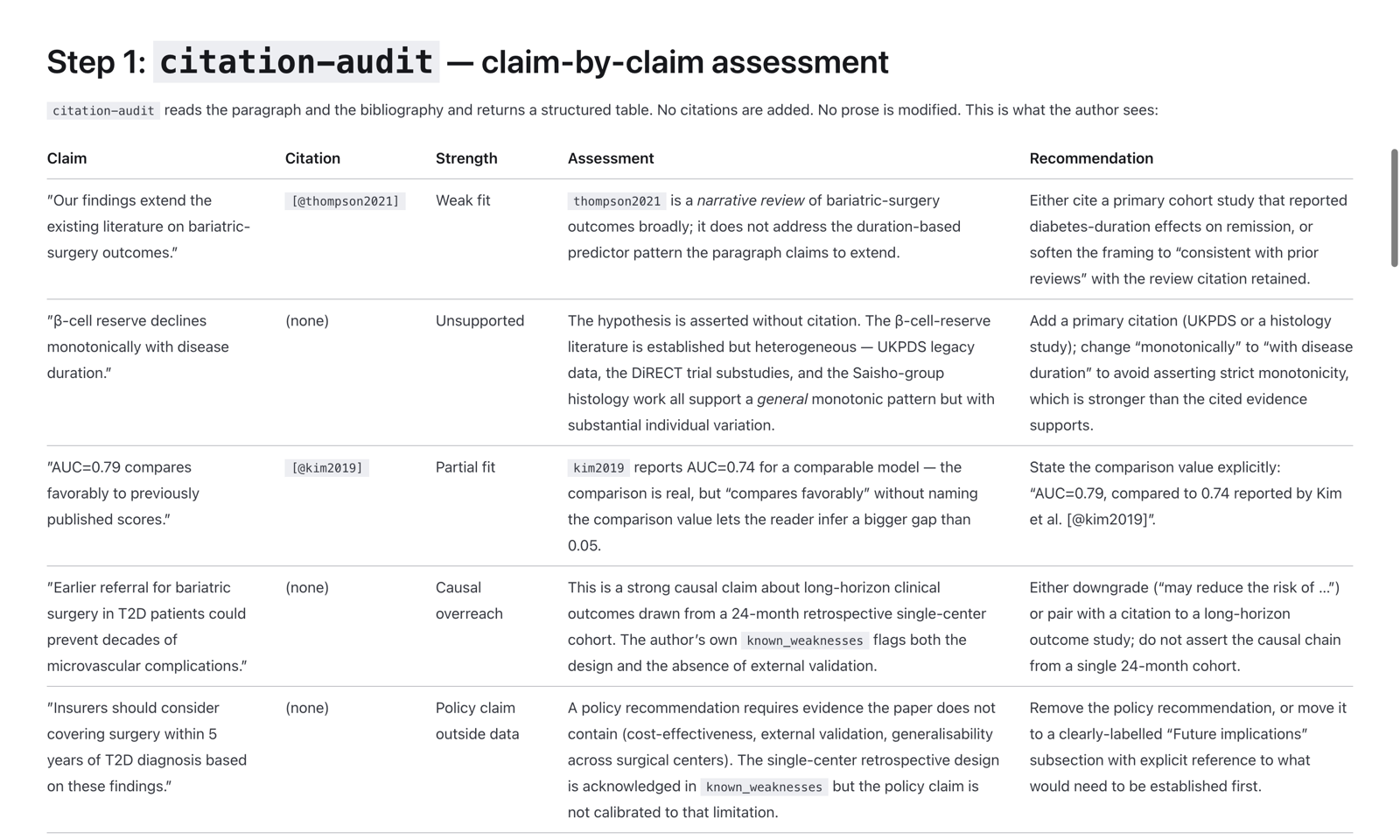
- scriptorium, a larger set of skills built on the same idea as this chapter’s: critique of prose the author already wrote, with no scores and no drafting from a blank page by default. It is for manuscripts and grants (citation audit, reviewer simulation, argument flow, and others) and runs in Claude Code or Codex, not ChatGPT. Its case study shows real output. Written by the course director.
Listen
- The Podcast by KevinMD, the episode above, if you skipped it.
Talks
- Week 2’s Wednesday talk on professional writing, with co-director Christina Olson. The recording is in Canvas.
- AI in medical education, for the attribution question that comes up the first time a chatbot helps with a presentation or a paper.